7 Best Data Curation Tools for Computer Vision of 2026

Product Manager at Encord
Finding and implementing a high-quality data curation tool in your computer vision MLOps Pipeline can be a hard and tedious process.
Especially since most tools require you to do a lot of manual integration work to make it fit your specific MLOps stack.
With SO many platforms, tools, and solutions on the market, it can be hard to get a clear understanding of what each tool offer, and which one to choose
Before comparing tools, it helps to understand the process itself. Read our full breakdown of what data curation involves and where these tools fit into the lifecycle.
In this post, we will be covering the top data curation tools for computer vision as of 2024. We will compare them based on criteria such as annotation support, features, customization, data privacy, data management, data visualization, integration with the machine learning pipeline, and customer support.
Best Data Curation Tools for Computer Vision
| Tool | Data Types | Open Source | Best For |
| Encord | Image, video, audio, LiDAR, text, documents, DICOM, geospatial | ❌ | Enterprise and physical AI teams curating multimodal data at scale |
| Sama Curate | Image, video, 3D/LiDAR | ❌ | Curation plus fully outsourced labeling |
| Superb Curate | Image, video, 3D/LiDAR | ❌ | No-code computer vision from curation to deployment |
| FiftyOne (Voxel51) | Image, video, 3D | ✅ Core | Code-first dataset exploration and model debugging |
| LightlyStudio | Image, video, audio, text, DICOM | ✅ Core | Picking the most valuable data to label |
| Scale Nucleus | Image, 3D/LiDAR | ❌ | AV teams already using Scale for labeling |
| Labelbox Catalog | Image, video, text, geospatial, LiDAR | ❌ | GenAI and computer vision datasets with one vendor |
Take a deeper look at the best data curation tools for computer vision in the sections below.
Encord
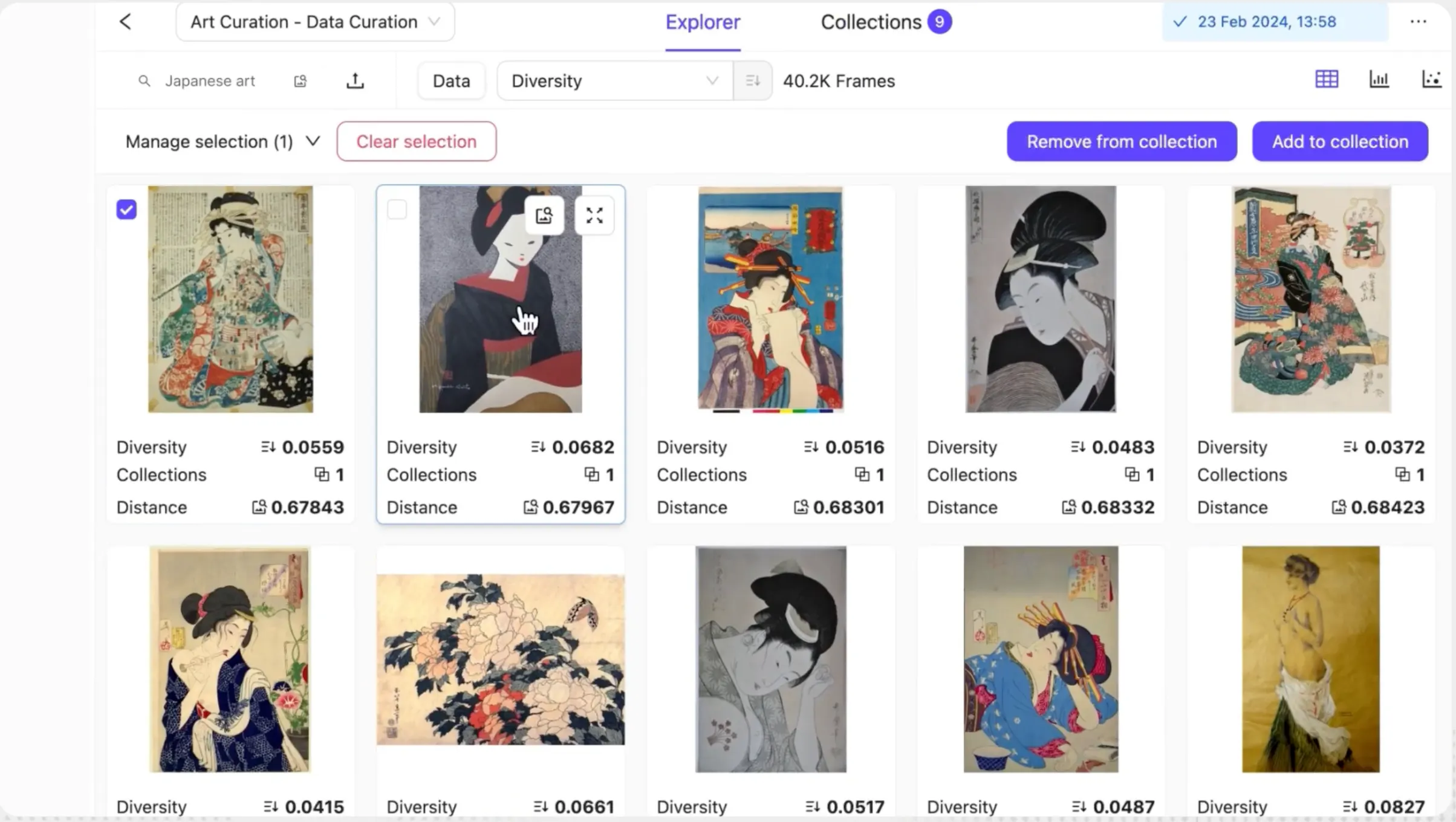
Encord is a multimodal data curation platform that helps AI teams find, filter, and prepare the most relevant data from all their sources before it goes to annotation or model training. It gives teams one place to explore images, video, audio, LiDAR, text, documents, DICOM, and geospatial data, with no data migration needed. Teams can connect their own cloud storage, search billions of data points with natural language, and use data metrics and embeddings to find gaps, outliers, and low-quality data. The result is smaller, cleaner, more balanced training datasets that improve model accuracy.
Benefits & Key features:
- Multimodal support: Curate video, image, audio, LiDAR, text, document, geospatial, HTML, and DICOM data in one place, shared across teams.
- Cloud-native, zero data migration: Self-host or connect to AWS, GCP, Azure, Oracle, or OTC storage in a few clicks. Your data stays in your own cloud.
- Natural language & similarity search: Find specific scenarios, edge cases, or near-duplicates without manual tagging.
- 40+ data metrics and custom metadata: Filter and slice large datasets by quality metrics and your own metadata to choose what to label next.
- Embeddings visualization: Use embeddings plots to spot outliers and under-represented areas of a dataset, then fill those gaps for fairer, more balanced data.
- Collections: Group, clean, and remove duplicate or poor-quality data in bulk, and run bulk classification before annotation.
- Built-in path to annotation: Send curated data straight into Encord’s annotation workflows without exporting or re-uploading.
- API/SDK-first: Automate curation in your existing data pipelines.
- Enterprise-grade security: SOC 2, HIPAA, and GDPR compliant.
Best for:
ML and data teams working with large, multimodal datasets who need to cut labeling costs and improve model performance by training on the right data, not just more of it. It’s a strong fit for physical AI and robotics teams handling video and LiDAR at scale, for regulated industries like healthcare that need data to stay in their own cloud, and for organizations that want curation and annotation in one platform.
Open source license:
Explore custom pricing for teams and enterprises.
Sama
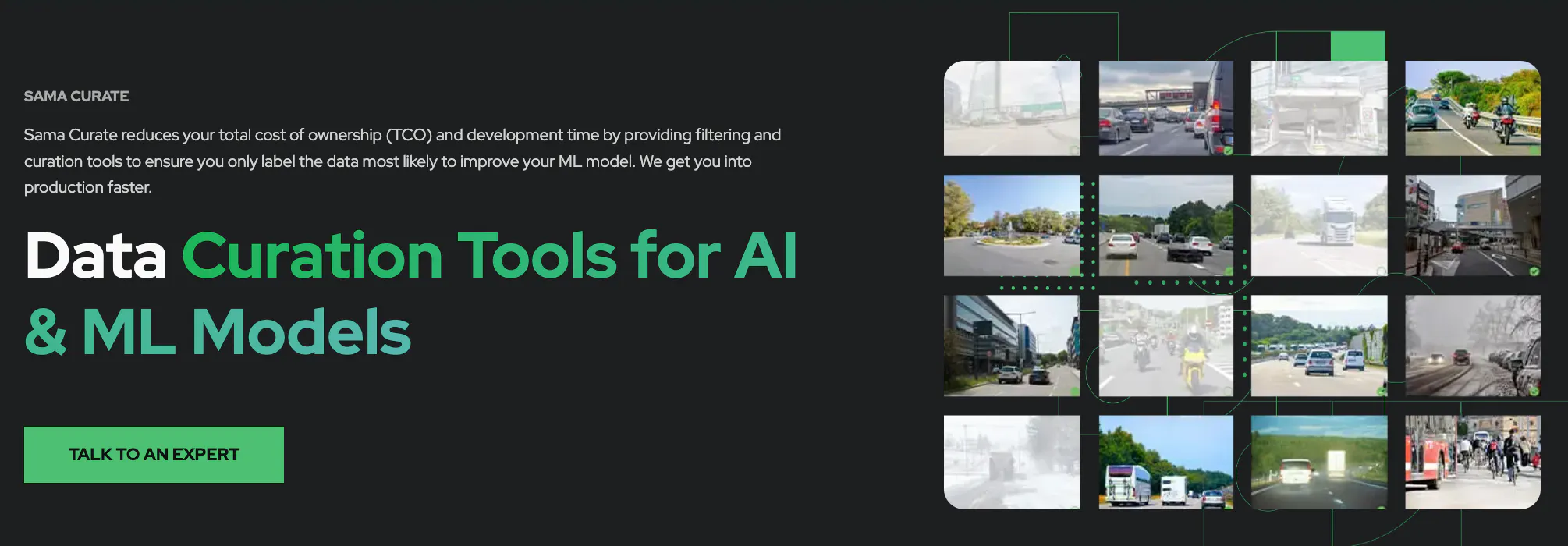
Sama Curate employs models that interactively suggest which assets need to be labeled, even on pre-filtered and completely unlabeled artificial intelligence datasets.
This smart analysis and curation optimize your model accuracy while maximizing your ROI. Sama can help you identify the best data from your “big data” database to label so that your data science team can quickly optimize the accuracy of your deep learning model.
Benefits & Key features:
- Interactive embeddings and analytics
- Machine learning model monitoring
- On-prem deployment
- Provides a streamlined process for corporates
Best for:
The ML engineering team looking for a tool with a workforce.
Open source license:
Sama does currently not have an open source solution.
Superb AI DataOps

Superb AI DataOps ensures you always curate, label, and consume the best machine learning datasets. Use SuperbAIs curation tools to curate better datasets and create AI that delivers value for end-users and your business.
Make data quality a near-forgone conclusion DataOps takes the labor, complexity, and guesswork out of data exploration, curation, and quality assurance so you can focus solely on building and deploying the best models. Good for streamlining the process of building training datasets for simple image datatypes.
Benefits & Key features:
- Similarity search
- Interactive embeddings
- Model-assisted data and label debugging
- Good for object detection as it supports bounding boxes, segmentation, and polygons
Best for:
The patient machine learning engineer looking for a new tool.
Open source license:
Superb AI does currently not have an open source solution.
Voxel FiftyOne
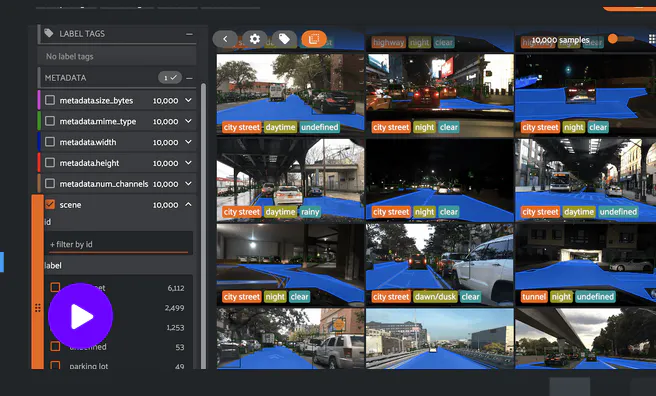
FiftyOne is a data curation and model analysis tool built by Voxel51. It’s one of the most widely used open-source tools in computer vision: Voxel51’s flagship open-source project FiftyOne has become a staple in computer vision. Teams use it to visualize datasets, find edge cases and label errors, and evaluate model performance. Voxel51 has moved beyond being a pure developer library. Voxel51 positions itself as an end-to-end multimodal data platform for physical AI, combining open-source FiftyOne with enterprise collaboration, dataset search, curation, and annotation
Benefits & Key features:
- Open-source core: A free Python library and app for exploring, querying, and visualizing image, video, and 3D datasets locally.
- FiftyOne Brain: Similarity search, uniqueness and representativeness scoring, and mistakenness detection to find duplicates, outliers, and likely label errors.
- Model evaluation: Built-in evaluation workflows to compare model predictions with ground truth and find failure modes.
- Natural language search: Text and video search, including natural-language video search in FiftyOne with TwelveLabs.
- Annotation and auto-labeling: Voxel51 has added labeling to the enterprise product, with releases covering auto labeling and native Kubernetes orchestration and, more recently, the FiftyOne Agent and next-generation annotation.
- Physical AI workflows: Voxel51 has introduced Voxel51 Search and multimodal time-series data workflows for physical AI.
- Model and Dataset Zoo: A large library of pre-trained models and public datasets you can load in a few lines of code.
- Integrations: Works with popular annotation tools, ML frameworks, and cloud storage.
Best for:
ML engineers, researchers, and developer-heavy computer vision teams who want a free, code-first way to explore and debug datasets and models. The enterprise version suits larger teams that need collaboration and cloud-backed data. FiftyOne is less suited to non-technical stakeholders or teams that want curation, annotation, and managed labeling services in one no-code platform.
Open source license:
FiftyOne’s core library is open source under Apache-2.0 and available on GitHub. The enterprise product is commercial. It’s priced by seats and compute capacity (VPUs), with custom enterprise services and support..
LightlyStudio (Lightly)
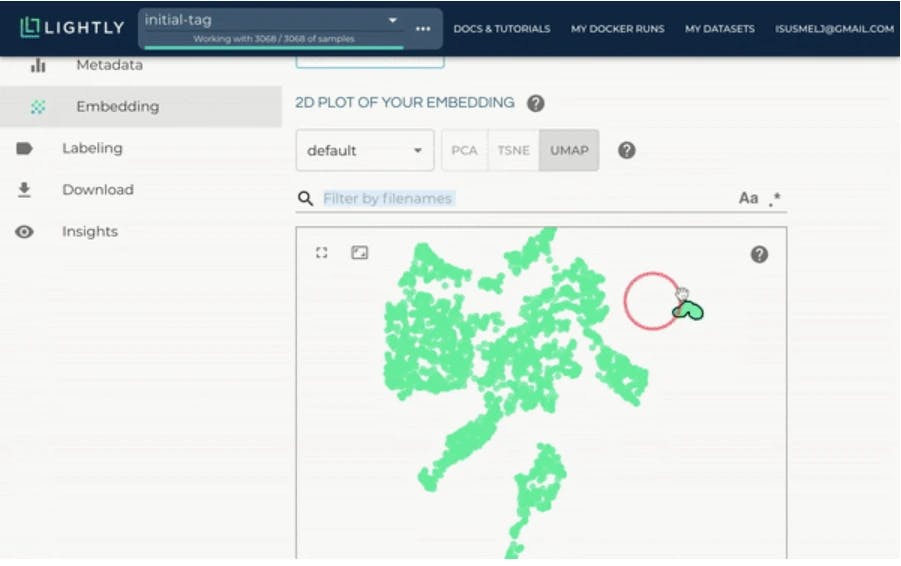
LightlyStudio is an open-source data curation and labeling platform from Lightly. It replaced Lightly’s earlier curation product, LightlyOne, and adds annotation, QA, and dataset management to Lightly’s embedding-based data selection. Lightly pairs it with LightlyTrain, a self-supervised pretraining framework, so teams can curate data in LightlyStudio and use it to pretrain or fine-tune vision models.
Benefits & Key features:
- Embedding-based data selection: Lightly’s core strength. It uses embeddings and active learning to find the most informative, diverse samples in large unlabeled image and video datasets and filter out redundant data before labeling.
- Curation and labeling in one tool: LightlyStudio unifies curation, labeling, and embeddings in one fast, developer-friendly platform.
- Modality support: LightlyStudio supports image, video, audio, text and DICOM data. Its strongest use cases remain image and video computer vision.
- Python SDK and API: Built for ML engineers who want to automate curation and import and manage data through code.
- LightlyTrain integration: Pretrain and fine-tune models on curated data with self-supervised learning.
- Security: ISO 27001 certified.
Best for:
Developer-led computer vision teams that want an open-source, code-first way to pick the most valuable images and video frames to label. It’s less proven for enterprise-scale multimodal workflows, such as multi-sensor physical AI data, and for organizations that need mature compliance coverage like HIPAA and SOC 2 for regulated data.
Open source license:
LightlyStudio is open-source. Some advanced features need a paid licence (e.g., automated selection) require a valid LightlyStudio license key. Find it on Github here.
Scale AI Data Engine (Nucleus)
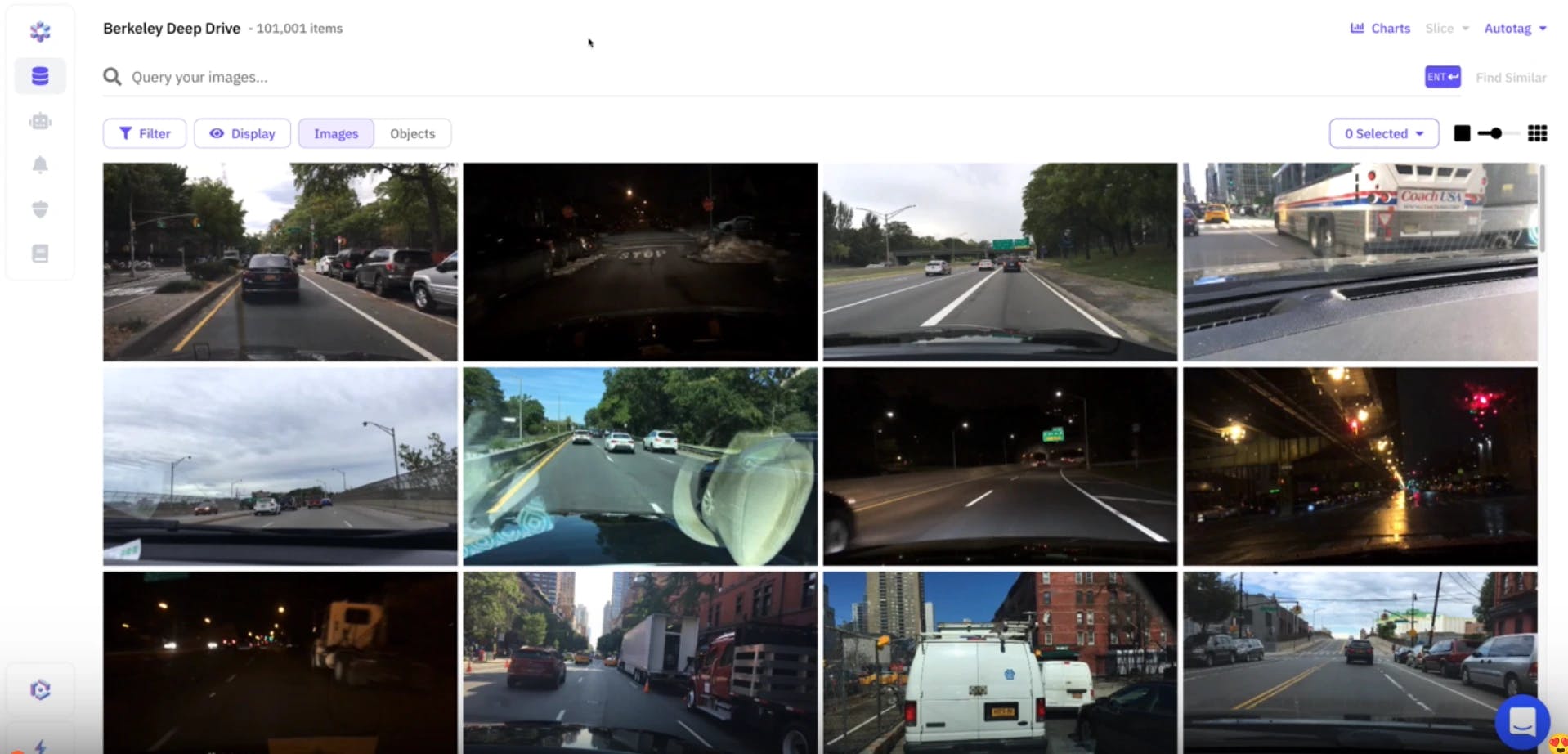
Nucleus is Scale AI’s dataset management and curation tool. It’s built mainly for teams that already use Scale’s labeling services.
Scale describes it as bringing your data and predictions together, empowering you to solve data quality issues, fix failure modes, and create better models faster. ML teams use Nucleus to explore large visual datasets, find edge cases where models fail, and decide which data to send for labeling next. It has been used most widely in autonomous driving and 3D perception
Benefits & Key features:
- Active learning and edge-case mining: Teams can curate unlabeled data with active learning, then mine rare edge cases to prioritize the highest-value data to send for labels next.
- Model debugging: Compare model predictions with ground truth to surface false positives, false negatives, and failure modes across data slices.
- Similarity search and autotagging: Find visually similar examples to build targeted datasets. Nuro, for example, used Nucleus’ Object Autotag and data curation workflows as a consistent platform for its ML engineers.
- 2D and 3D data support: Supported annotation types include bounding boxes, classification, segmentation, polygons, polylines, and cuboids, with support for LiDAR and sensor fusion data.
- Tight integration with Scale labeling: Curated slices can go straight to Scale’s annotation workforce.
- Proven in AV: Nucleus reduced training data selection times for Velodyne’s data team by 50%.
Best for:
ML teams, that already use Scale AI for annotation and want curation and labeling with the same vendor.
It’s less suited to teams that want a vendor-neutral curation layer, need to curate non-visual data like audio or documents, or want to keep data in their own cloud without depending on one labeling provider.
Open source license:
Scale Nucleus is not open source. It’s a commercial product with custom pricing. Scale has also offered discounted Scale AI platform credits for early-stage AI startups working on data curation and model evaluation
Labelbox

Labelbox is a data-centric AI platform that combines data curation, annotation, model evaluation, and a managed labeling workforce. Its curation features live in Catalog, which Labelbox describes as an interactive, searchable index of all your training data.
Teams use Catalog to explore large unstructured datasets, find high-value or problem data, and send it straight into labeling. Over the past few years, Labelbox has shifted much of its focus toward generative AI and frontier model data, alongside its computer vision roots
Benefits & Key features:
- Cloud storage integration: Once you connect Labelbox to your AWS, GCP, or Azure accounts you can securely add all of your data to datasets in Labelbox.
- Embeddings, natural language, and similarity search: Catalog lets teams filter for specific data, such as with an embeddings search, natural language search, metadata, or projector embeddings, to quickly find all instances of similar data. Teams can use Labelbox-generated embeddings or bring their own.
- Combined structured and unstructured search: Mix metadata filters, annotations, and semantic search in a single query to surface specific subsets of data.
- Search at scale: Labelbox search operates at a scale of 100+ million data points.
- Bulk classification: Teams can classify a large amount of unlabeled data in a few clicks directly from Catalog.
- Direct path to labeling: Prioritized data can be sent from Catalog straight into a project’s labeling queue, with model-assisted pre-labeling available.
- Managed workforce: An optional expert labeling service for teams that need outsourced annotation capacity.
Best for:
Teams that want curation, labeling, and a managed workforce from one vendor, especially those building generative AI and LLM datasets or working mainly with images, video, and text. It’s less specialized for physical AI workflows, such as multi-sensor robotics data.
Open source license:
Labelbox is not open source. It offers a free tier and usage-based pricing
What is Data Curation in Computer Vision?
Data curation is a relatively new focus area for Machine Learning teams. Essentially it covers the management and handling of data across your MLOps pipeline. More specifically It refers to the process of 1) collecting, 2) cleaning, 3) organizing, 4) evaluating, and 5) maintaining data to ensure its quality, relevance, and suitability for your specific computer vision task.
In recent times it has also come to refer to finding model edge cases and surfacing relevant data to improve your model performance for these cases.
Before the entry of the data curation paradigm, Data Scientists and Data Operation teams were simply feeding their labeling team raw visual data which was labeled and sent for model training. As training data pipelines have matured this strategy is not practical and cost-effective anymore.
This is where good data curation enters the picture.
Without good data curation practices, your computer vision models may suffer from poor performance, accuracy, and bias, leading to suboptimal results and even failure in some cases.
Furthermore, once you’re ready to scale your computer vision efforts and bring multiple models into production, the task of funneling important production data into your training data pipeline and prioritizing what to annotate next becomes increasingly challenging. In the base case, you’d want a structured approach, and in the best case a highly automated data-centric approach.
Lastly, as you discover edge cases for your computer vision models in a production environment, you would need to have a clear and structured process for identifying what data to send for labeling to improve your training data and cover the edge case.
Therefore, having the right data curation tools is crucial for any computer vision project.
What to Consider in a Data Curation Tool in Computer Vision?
Having worked with hundreds of ML and Data Scientist teams deploying thousands of models into production every year, we have gathered a comprehensive list of best practices when selecting a tool. The list is not 100% exhaustive, so if you have anything you would like to add we would love to hear from you here.
Data Prioritization
Selecting the right data is crucial for training and evaluating computer vision models. A good data curation tool should have the ability to filter, sort, and select the appropriate data for a given task. This includes being able to handle large datasets, as well as the ability to select data based on certain attributes or labels. If the tool supports reliable automation features for data prioritization that is a big plus.
Visualizations
Customizable visualization of data is important for understanding and analyzing large datasets. A good tool should be able to display data in various forms such as tables, plots, and images, and allow for customization of these visualizations to meet the specific needs of the user.
Model-Assisted Insights
Model-assisted debugging is another important feature of a data curation tool. This allows for the visualization and analysis of model performance and helps to identify issues that may be present in the data or the model itself. This can be achieved through features such as confusion matrices, class activation maps, or saliency maps.
Modality Support
Support for different modalities is also important for computer vision. A good data curation tool should be able to handle multiple different types of data such as images, videos, DICOM, and geo. tiff, while extending support to all annotation formats such as bounding boxes, segmentation, polyline, keypoint, etc.
Data Management
The data curation tool should efficiently handle large image datasets, offer seamless import/export functionalities, and provide effective organization features like hierarchical folders, tagging, and metadata management. It should support annotation versioning and quality control to ensure data integrity and consistency.
Simple & Configurable User Interface (UI)
A data curation tool is often used by multiple technical and non-technical stakeholders. Thus a good tool should be easy to navigate and understand, even for those with little experience in computer vision. Setting up recurring automated workflows should be supported while programmatic support for webhooks, API calls, and SDK should also be available.
Annotation Integration
Recurring annotation and labeling a crucial part of data curation for computer vision. A good tool should have the ability to easily support annotation workflows and allow for the creation, editing, and management of labels and annotations.
Collaboration
Collaboration is also important for data curation. A good tool should have the ability to support multiple users and allow for easy sharing and collaboration on datasets and annotations. This can be achieved through features such as shared annotation projects and real-time collaboration.
Why Is Data Curation Important in Computer Vision?
Data curation is critical in computer vision because it directly affects the performance and accuracy of models. Computer vision models rely on large amounts of data to learn and make predictions, and the quality and relevance of that data determine the model's ability to generalize and adapt to new situations.
Conclusion
Data curation is a crucial aspect of any computer vision project. Without good data curation practices, your models may suffer from poor performance, accuracy, and bias. To ensure the best results, it is essential to have the right data curation tools.
In this article, we have covered the top 7 data curation tools for computer vision of 2023, comparing them based on criteria such as annotation support, features, customization, data privacy, data management, data visualization, integration with the machine learning pipeline, and customer support.
We hope that this article has provided valuable information and insights to help you make an informed decision on which data curation tool is best for your specific use case and budget. In any case, it is important to keep in mind that tool selection should be based on your specific needs, budget, and team size.