How to annotate video for ADAS and autonomous driving: A Technical Guide

Head of Forward Deployed Engineering at Encord
TL;DR: Video annotation for ADAS is the process of labeling driving footage so a model can track objects, estimate distance, and understand scene context across time, not just within a single frame. It differs from image annotation in one fundamental way: a self-driving model doesn't care what a pedestrian looked like in frame 214, it cares whether that's the same pedestrian it saw in frame 213, moving at the same velocity it predicted. Per-frame image labeling breaks down here because it treats each frame as an independent event and discards the temporal signal the model actually needs. This guide covers how to track objects across frames, fuse camera, LiDAR, and radar data over time, adjust annotation depth by ADAS level, handle condition and regional variance, and run QA that catches failures frame-level review misses.
How is video annotation different from image annotation for ADAS and AV?
Image annotation labels a still frame. Video annotation labels a sequence, and the sequence is the point. A model trained on ADAS or AV data isn't learning "what is a cyclist," it's learning "where will this cyclist be in 400 milliseconds." That second question only exists if the annotation preserves identity and motion across frames.
Frame volume and why per-frame labeling is structurally wrong for driving footage
A single hour of driving footage at 30 fps and multiple camera views generates well over 100,000 individual frames. Labeling each one as an independent image means an annotator (or an auto-labeler) re-detects, re-classifies, and re-draws the same car, the same pedestrian, the same lane line, hundreds of times over, with no guarantee that annotator A's box around "vehicle 14" in frame 200 refers to the same physical vehicle as annotator B's box in frame 201. The volume problem isn't just cost. It's a data integrity problem: without persistent identity, downstream tracking and prediction models have nothing to train on.
What temporal consistency actually requires
Temporal consistency means every annotated object keeps the same ID across the frames it appears in, and its shape, position, and attributes evolve in a way a human reviewer could plausibly explain by physics, not by annotator inconsistency. This is the deeper reason per-frame labeling fails: it's not just slower, it removes the exact signal (motion, persistence, trajectory) that ADAS perception and prediction models are built to learn.
Which annotation types actually work in video
The right annotation type for driving footage is less about the shape and more about how that shape behaves across a sequence.
| Annotation type | What it captures | How it behaves across frames |
| Bounding box + interpolation | Vehicles, pedestrians, cyclists | Annotator sets keyframes; the box is interpolated between them, then corrected wherever real motion deviates from a straight interpolation (turns, acceleration, occlusion) |
| Polygon / mask (segmentation) | Drivable area, vegetation, irregular obstacles | Mask boundaries update per frame but must track the same instance ID; used where a box would include too much background |
| Polyline | Lane markings, road edges | Vertices adjust frame to frame as the ego vehicle's perspective shifts, but the marking's real-world identity stays fixed |
| Keypoints / skeleton | Pedestrian pose, cyclist orientation | Points persist per joint across frames, useful for predicting intent (is this pedestrian about to step into the road) rather than just detecting presence |
Encord's video tooling supports object tracking, rotatable bounding boxes, polygon and panoptic segmentation, and polylines natively on video, with interpolation applied automatically between keyframes so annotators correct deviations rather than redraw every frame.
How do you track objects across frames in driving video?
You track objects by assigning a persistent ID at first detection and carrying that ID forward through interpolation, correcting it only where the object's real behavior breaks the model's assumption of smooth motion.
Persistent ID assignment and the keyframe + interpolation workflow
The standard workflow: an annotator places a box, mask, or polyline on a keyframe, places another on a later keyframe, and the system interpolates every frame in between. The annotator's job shifts from "draw this object 900 times" to "review the interpolation and fix the handful of frames where it's wrong." Encord's object tracking and related-objects tooling handles this natively on video, so tracking setup doesn't require a separate pass after initial labeling.
Choosing a keyframe interval
Keyframe interval is a direct tradeoff between annotation speed and interpolation error, and the right interval depends on how fast the scene changes, not on a fixed rule. A highway scene with steady-state traffic tolerates a wider keyframe interval because motion is close to linear. A dense urban intersection with pedestrians changing direction, vehicles turning, and frequent occlusion needs a tighter interval, because linear interpolation across a turn produces a box that clips the corner of the actual object path. A useful working rule: set keyframes wherever velocity or direction changes, not on a fixed frame count.
Occlusion, re-entry, merge/split, and class-switching: the 4 failure modes automation misses
Automated tracking degrades in four specific, recurring ways on driving footage:
- Occlusion: A pedestrian walks behind a parked van and the tracker either drops the ID or, worse, silently starts a new one when the pedestrian re-emerges.
- Re-entry: An object that leaves and re-enters the frame (a cyclist who passes out of camera view and back in) needs its original ID reassigned, not a fresh one.
- Merge/split: Two pedestrians walking close together get detected as one box, then split into two; the tracker needs rules for which ID survives the split.
- Class-switching: A tracker briefly reclassifies a motorcycle as a bicycle mid-sequence due to a partial view, and without review, that misclassification propagates through every interpolated frame until the next keyframe correction.
These four failure modes are exactly why tracking QA can't be automated end to end. A structured multi-object tracking benchmark like nuScenes exists in large part because robust detection and tracking of objects is crucial for deploying autonomous vehicle technology, and most autonomous vehicles carry a combination of cameras and range sensors such as LiDAR and radar that a tracking system has to reconcile through exactly these failure modes.
How do you annotate 3D and sensor-fused video for depth and distance?
You annotate 3D and sensor-fused video by placing cuboids or point cloud labels that persist and move plausibly across frames, while keeping identity aligned across every sensor that's viewing the same object at the same moment.
3D cuboids in motion
A 3D cuboid captures an object's position, size, and orientation in real-world space, not just its outline in a 2D image. In video, the cuboid has to move the way the object actually moves: a car's cuboid should rotate smoothly through a turn, not snap between orientations frame to frame. Physically implausible cuboid motion (an SUV appearing to instantaneously reorient) is one of the fastest tells that an automated 3D tracker has lost the object and is re-detecting from scratch.
Camera + LiDAR + radar identity persistence over time
Sensor fusion QA is usually framed as a per-frame agreement problem: does the camera's bounding box line up with the LiDAR cuboid in this frame. That's necessary but not sufficient for video. The harder requirement is that the same object keeps the same fused identity across frames, across sensors, at once, a vehicle detected by radar and confirmed by LiDAR in frame 100 needs to still be the same tracked object in frame 150, even though radar and LiDAR each have their own detection noise and dropout patterns.
Cross-camera identity for multi-camera rigs
Most AV and ADAS stacks run multiple cameras with overlapping fields of view. A pedestrian visible in the front-left and front-center cameras simultaneously needs one identity across both, not two independently tracked objects that happen to represent the same person. This is where annotation tooling either supports multi-view annotation natively or forces manual reconciliation after the fact, which is slow and error-prone at scale.
What annotation requirements change between ADAS levels and full autonomy?
Requirements scale with how much decision-making the system takes on. Lower levels need narrow, real-time-constrained annotation. Higher levels need everything, plus edge-case and intent coverage that lower levels can skip.
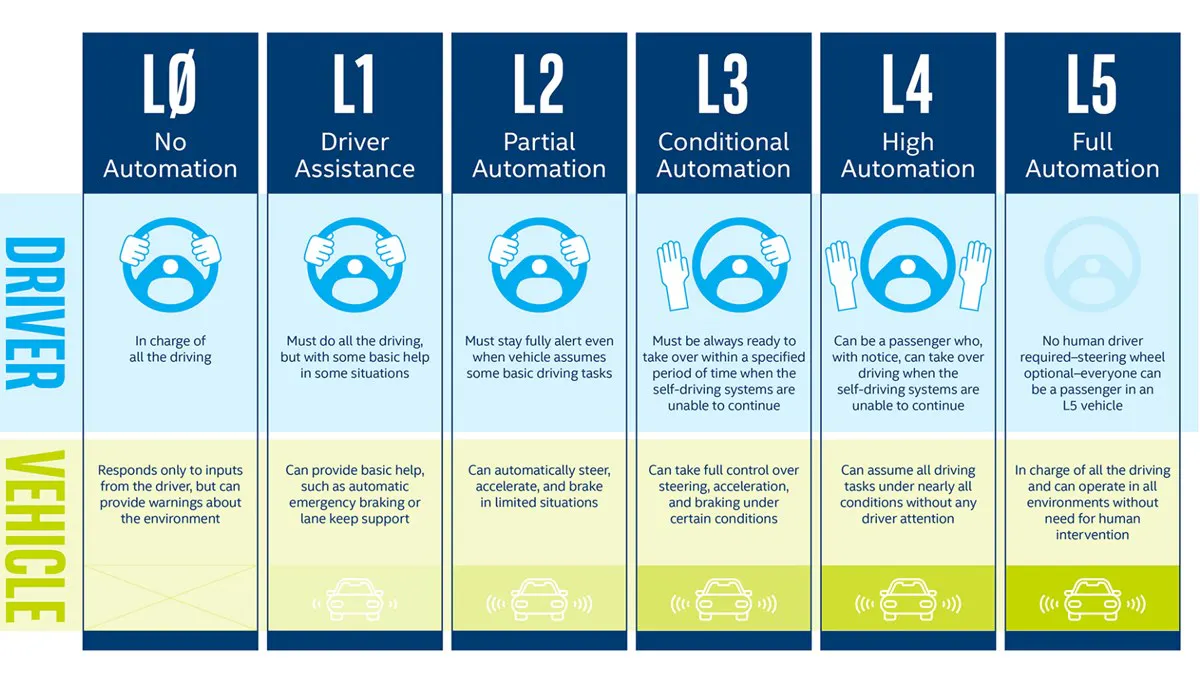
| ADAS / AV level | Core annotation requirements | Real-time constraint |
| L1–L2 (driver assistance, partial automation) | Lane boundary, road edge, drivable area, distance cues to lead vehicle | Tight — annotation quality directly gates a system making split-second lane-keeping or braking decisions |
| L3–L5 (conditional to full automation) | Everything in L1–L2, plus intent prediction (is that pedestrian about to cross), construction zone handling, long-tail edge-case coverage | Less about single-frame latency, more about coverage breadth across scenarios the system must handle without a human fallback |
The practical implication: an L2 lane-keep system doesn't need annotated data on unusual construction zone configurations. An L4 system does, because at L4 there's no driver to hand control back to when the scenario falls outside training coverage.
How do you handle weather, lighting, and regional driving conditions in video?
You handle it by treating condition coverage as a quality metric you track deliberately, not a byproduct of whatever footage happened to get collected.
Condition coverage as a quality signal, not an afterthought
A dataset that's 90% clear-daylight highway footage will train a model that's confident and wrong in rain, fog, or low-light conditions it never saw enough of during training. Condition coverage such as, rain, snow, glare, dusk, night, fog, needs to be tracked as its own metric alongside standard class balance, because a model can pass every accuracy check on a condition-imbalanced test set and still fail in the field.
Encord's curation tooling supports filtering and clustering driving data by embedding similarity specifically to surface underrepresented conditions before they become a training gap instead of after.
Regional variance
Lane conventions, signage, and traffic mix vary meaningfully by region, right-hand vs. left-hand traffic, the prevalence of two- and three-wheeled vehicles in some markets, regional signage standards, informal lane use in dense urban traffic. A model trained exclusively on one region's driving conventions will misread scenarios that are routine somewhere else. Regional variance needs the same deliberate coverage tracking as weather and lighting conditions, not an assumption that "driving is driving."
What QA catches video-specific failures that frame-level review misses?
Track-level review catches the failures that random-frame spot checks are structurally blind to, because the failure only shows up when you look at how a label changes across time.
Per-track audits vs. random-frame audits
Random-frame QA samples individual frames and checks whether each label looks correct in isolation. That catches obvious box or class errors, but it can't catch an identity swap, because a swapped ID still produces a perfectly reasonable-looking box in any single frame you happen to sample. Per-track audits instead review a full object's trajectory end to end, which is the only way to catch an ID that silently changed midway through a sequence. Encord's review workflows support this kind of multi-frame, per-track review alongside standard label QA, so identity errors get caught before they reach a training set.
Temporal smoothness checks
Temporal smoothness checks flag frames where an object's position, size, or orientation changes more sharply than physically plausible motion allows, which is usually a sign of interpolation drift or a silent identity swap rather than genuine object behavior. This section is deliberately scoped to video-motion failure modes only.
Video annotation platforms for ADAS: what actually differs
Every platform in this space will claim video and 3D support. The practical difference is whether that support is native or retrofitted from a 2D-first tool, and that shows up specifically in tracking stability, sensor fusion depth, and how much manual reconciliation work survives after the automated pass.
| Capability | Native video/3D-first platforms (e.g., Encord) | General-purpose / retrofitted 2D-first tools |
| Video rendering | Native rendering preserves temporal context frame to frame | Often frame-split, which can break temporal continuity between frames |
| Object tracking | Built-in persistent ID with interpolation across keyframes | Frequently added after the fact, more prone to drift on occlusion and re-entry |
| Sensor fusion (camera + LiDAR + radar) | Synchronized on one timeline with cross-sensor identity | Often per-sensor annotation reconciled manually afterward |
| 3D cuboid motion | Built for physically plausible motion across frames | 3D support frequently adapted from 2D tooling, per third-party comparisons of the space |
Proven in production
Encord's AV and ADAS work centers on synchronized multi-sensor annotation, not single-modality labeling in isolation. Automotus, which uses Encord for computer vision on curb and roadway management, achieved a 20% increase in model performance after consolidating their data and model-performance feedback loop into one platform. Their co-founder and head of computer vision put it this way:
Frequently asked questions
Video annotation for ADAS is the process of labeling driving footage across time, rather than as isolated frames, so a model can learn object identity, motion, and trajectory in addition to what an object is. It typically covers object tracking, 3D cuboid annotation, sensor-fused labeling across camera, LiDAR, and radar, and lane or drivable-area marking.
Image annotation labels a single frame with no persistence requirement. Video annotation requires that the same object keep a consistent identity across every frame it appears in, which is what allows a model to learn motion and predict future position rather than just detect presence.
There's no fixed number. Set keyframes wherever an object's velocity or direction changes meaningfully, more frequently in dense, fast-changing scenes like urban intersections, less frequently in steady-state scenes like highway cruising.
Synthetic data can extend coverage for rare or dangerous scenarios that are hard to collect safely in the real world, but it doesn't fully replace real annotated footage, since models trained purely on synthetic data risk missing the sensor noise, lighting variance, and long-tail unpredictability of real driving conditions. Most production programs use synthetic data as a coverage supplement, not a substitute.
This depends heavily on ADAS level and operational domain rather than a single number: an L2 lane-keep system needs deep coverage of a narrow scenario set, while an L4 system needs broad coverage across a much wider range of conditions, geographies, and edge cases. Coverage depth matters more than raw hours of footage.